

When something changes in your infrastructure, the first question is always the same: what happened, and who did it? The client area now answers that directly. The new Activity Log keeps a complete chronological record of every action in your cloud service, and clearer operational feedback tells you how each action went while it runs.
Every action, with the details that matter
Each entry records the action itself, which resource it touched, who initiated it, when it ran, the originating IP address, and whether it succeeded or failed. You can filter by resource, status, or date range, or search across actions, usernames, and IP addresses.
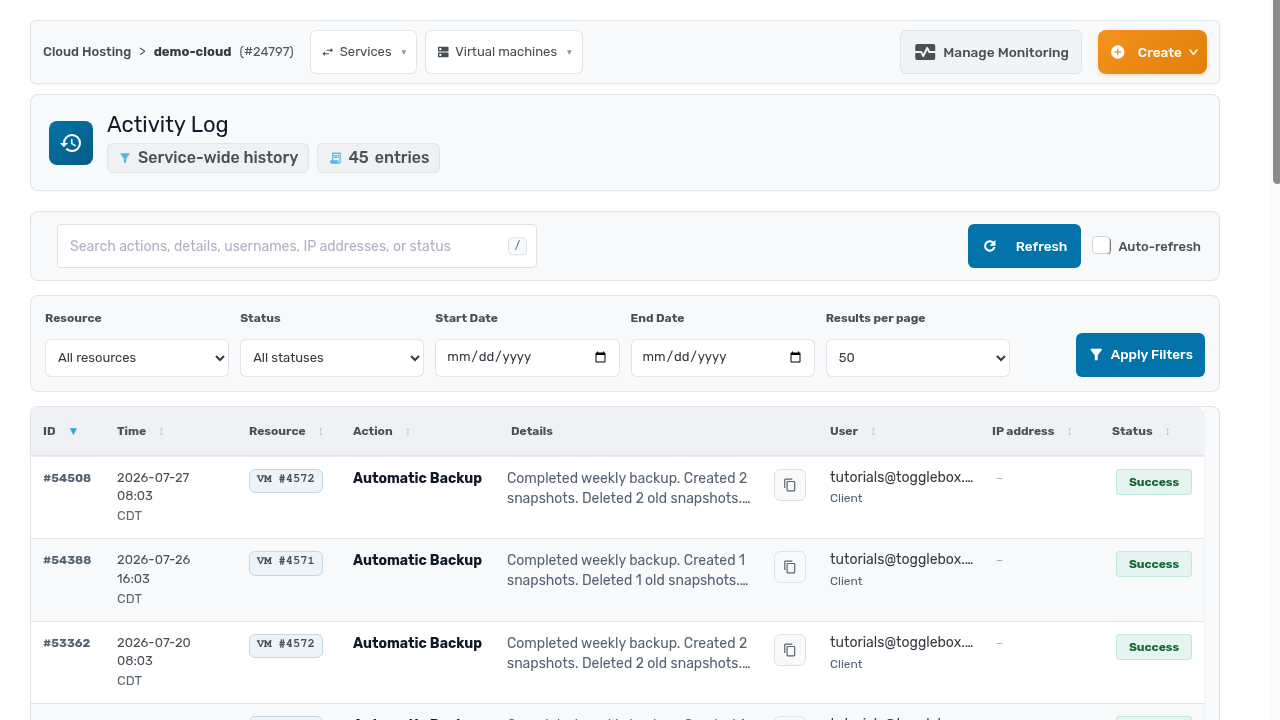
This matters most when you are reconstructing events. A VM rebooted overnight and nobody claims it. A firewall rule changed and something stopped answering. An auditor wants proof of who had access and what they did with it. Instead of piecing the story together from fragments, you read it in one place: troubleshooting, compliance reviews, and internal accountability all draw from the same record.
Better feedback while actions run
We also improved what you see during operations. Actions report their progress more clearly, and when something fails, the error message tells you what actually went wrong rather than leaving you to guess. Less time deciphering, more time fixing.
The Activity Log is live now for all Cloud VPS services. You will find it in the sidebar of your cloud service in the client area.
