

Cloud bills have a way of arriving as a single number that explains nothing. The client area now breaks that number apart at two levels: per VM and across your whole service.
Per-VM breakdown
Every virtual machine shows what it costs and where that cost comes from. Click the price chip on any VM to see its breakdown. When one workload eats a surprising share of the bill, you find it in seconds. No exporting invoices into a spreadsheet.
Service-wide breakdown
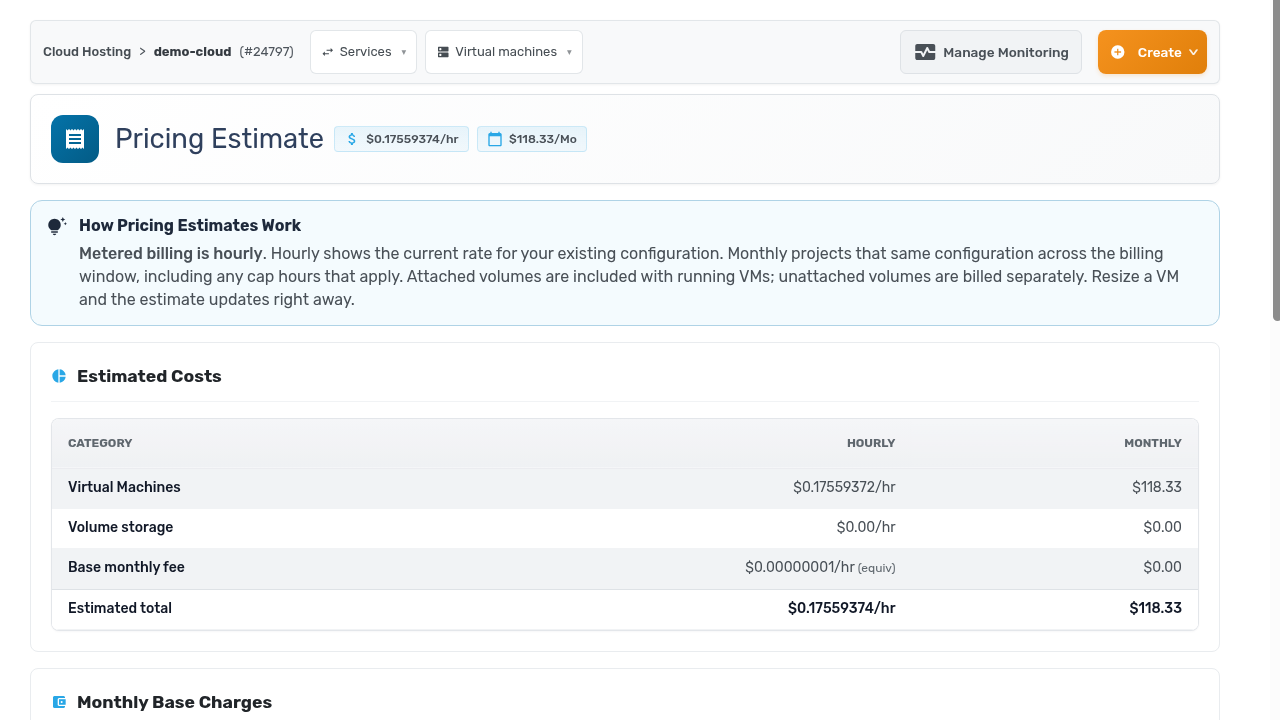
The service-level estimate rolls everything up by category: virtual machines, volume storage, and base fees. Hourly and monthly figures sit side by side. Metered billing is hourly, so the estimate updates the moment you resize a VM. You see the cost of a change right away instead of on next month’s invoice.
Why bother
Cost tuning only works when you can see cause and effect. Now you can answer “what happens to the bill if we resize this?” before you commit. And “why did the bill go up?” gets an answer that names the machine.
You will find both under Billing in your cloud service sidebar.
