

Every Cloud VPS now runs with Performance Guard, our cluster load balancing system. It watches host load across the whole cluster and moves work off a busy host before the neighbors there slow your VPS down. Every Cloud VPS plan includes it. You do not have to turn it on.
The noisy neighbor problem
A VPS shares a physical host with other instances. Usually nobody notices. Then a neighbor starts a large database import and the host runs hot. Your VPS feels slow, and you changed nothing. On most hosting you wait it out or open a ticket.
What Performance Guard does
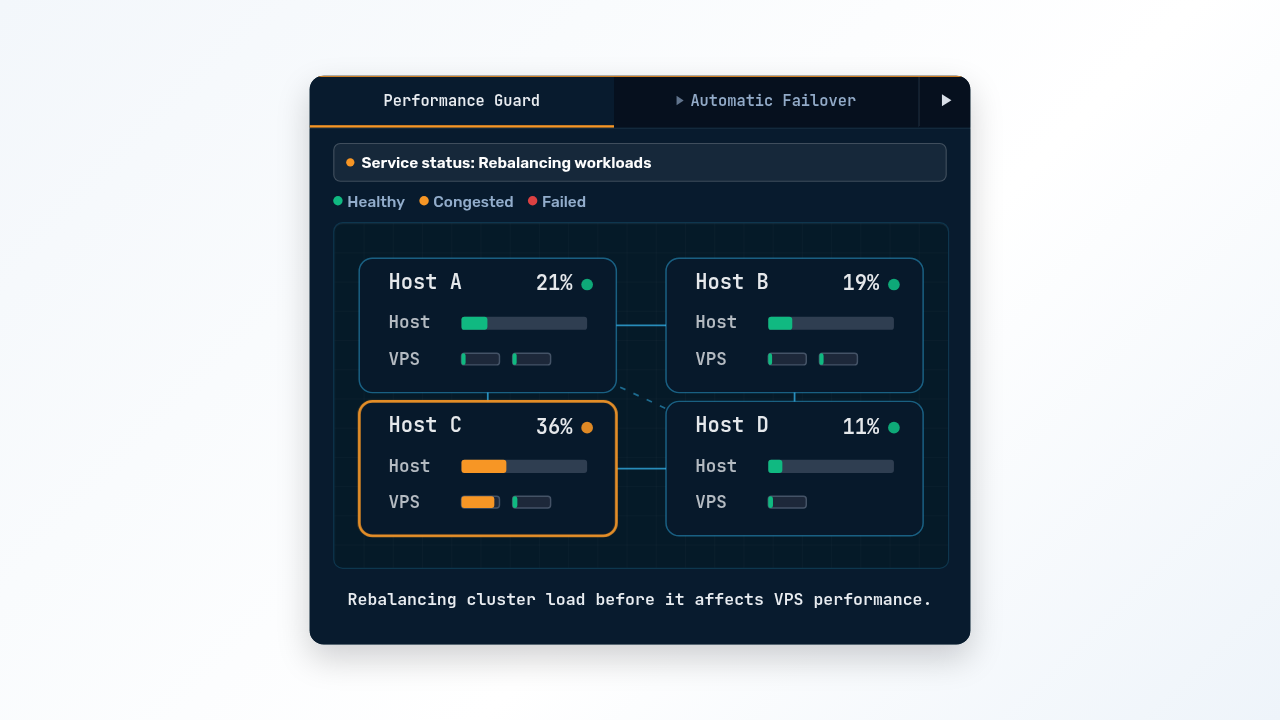
Performance Guard monitors CPU, RAM, disk I/O, and network on every host in the cluster. When contention on one host crosses a threshold, it shifts load toward hosts with more headroom. In the fleet monitor above, Host C is climbing while B and D sit mostly idle. Performance Guard catches the trend and spreads the work back out before the VPSs on Host C feel it.
The rebalance runs in the background. Your VPS stays up the whole time and keeps its IP addresses. Most customers never know it happened.
What happens when a host fails
The same cluster design handles hardware failure. Your VPS disk lives on distributed NVMe storage, replicated three times across the cluster. It was never local to the host your VPS runs on. If that host dies, your VPS restarts on a healthy one from the same storage. You get a short restart window instead of a rebuild, and the failure loses no data.
Failover does not protect you from a bad deploy or a dropped table. Automatic Cloud VPS backups cover those.
What you need to do
Performance Guard is part of the Cloud VPS platform and runs on every plan, Linux or Windows, hourly or monthly. It is not an add-on and has no setting. You should see steadier performance, especially in the busy hours when shared hosts get crowded.
The Cloud VPS overview explains the cluster in more detail. To size a server and run it by the hour, go to Cloud VPS pricing.
